
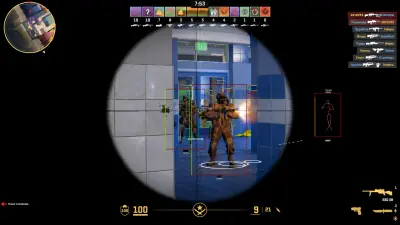
CS2 ESP Explained: Player Markers, Skeletons, Boxes and Health
Compare the documented visual tools by the information they provide during a CS2 round.
ESP is extra information shown on screen about other players. In the FACEIT package, the documented visual tools are player ESP, skeleton, box, health and radar, plus an overlay described as stream-proof. Each name identifies a different way of presenting information. None of them is a substitute name for aimbot control.
Player position as the starting point
Player ESP marks positions on screen. That gives a location reference while you look through a CS2 scene. The summary does not specify names, distance values, team filters or colors, so those should not be assumed from the term ESP alone.
For example, knowing that a position marker exists does not tell you whether it includes a label or a number. The product feature list is the place to check the actual documented display types rather than borrowing details from a generic overlay guide.
Skeleton and box show different shapes
Skeleton draws a bone outline over the player model. Box draws a frame around the player. A skeleton emphasizes model structure; a box emphasizes the area occupied by the player on screen. These are visual references, not statements about damage or aim priority.
The source does not document line thickness, box styles, color pickers or individual switches for every visual. Describing what a display shows is supported. Inventing how a menu lets you style it is not.
Health and radar add context
Health shows a player’s health. Radar shows player positions in a radar-style view. Health is a status reference, while radar is a position reference. Neither feature establishes an automatic decision about which enemy the aimbot should select.
The radar guide explains the difference between a scene marker and a radar-style position view. Its layout, scale and placement are not documented in the supplied feature list.
Capture claims need their own boundary
The overlay is described as stream-proof. There are no documented capture methods, recording applications or conditions to support a universal capture guarantee. Keep that description separate from both the visual feature list and detection claims.
For aim selection, read the FOV guide and visible-check explanation. For a purchase decision, review platform and requirements as well as visual features. The package is FACEIT-only and needs Windows 10 or 11 with the listed security settings and separate Cloud DMA.