
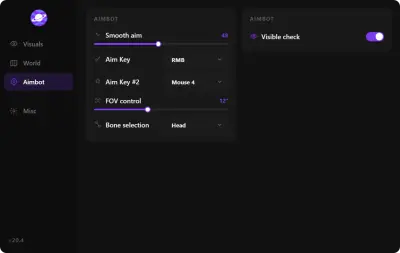
CS2 Aimbot FOV: What the Targeting Area Controls
Learn how a smaller or larger FOV changes the aimbot’s target-search area without inventing numeric presets.
FOV means field of view. In the CS2 FACEIT package, FOV control defines the area where the aimbot looks for targets. A smaller FOV keeps that search close to your crosshair; a larger one covers more of the screen. It describes the search area, rather than a promise about accuracy or round outcomes.
Think in screen areas
Imagine two enemies on screen: one near the crosshair and another farther to the side. A narrow search area may include the first while leaving the second outside it. Expanding the area can bring more of the screen into consideration. This example explains the control without assuming a particular value or menu design.
The product summary does not document minimum or maximum values, units, a visible FOV ring or a recommended preset. A number copied from another CS2 product may not mean the same thing here. Use the controls described by the actual FACEIT Version.
FOV is one part of target selection
Bone selection determines the part of the enemy model to aim at. Visible check limits aiming to visible enemies. These are different decisions from the width of the search area. An enemy being inside the FOV does not make the visibility condition irrelevant.
Smooth aim is also listed. The documentation does not establish an adjustable smoothing range, so a guide should not pair a made-up smoothness value with a supposed ideal FOV. See bone selection and visible check for how the documented controls differ.
Keep aim and visual information separate
ESP, health information and radar display information about players. Their presence does not define the aimbot’s FOV. Likewise, changing an aim-search area does not document changes to the radar or the visual overlay. The ESP guide explains those information tools separately.
Save the choice you actually made
Config save/load is part of the package. Once you have chosen settings using the product’s instructions, a saved configuration provides a way to revisit them. The storage location and any synchronization behavior are not specified. Review the configuration guide for that distinction.
The useful question is which screen area you want the aimbot to consider. Begin with that purpose, then check the available controls on the FACEIT product page. There is no documented universal FOV value for every player or situation.