
CS2 Faceit Cheats: FACEIT Version
Aim controls, player ESP and saved configs for Counter-Strike 2 on FACEIT. Built for FACEIT lobbies only; standard Valve matchmaking and Premier are outside its scope. Windows 10 or 11 and Cloud DMA are needed.
Product Overview
At a glance
Key capabilities
The short list for CS2 Faceit Cheats, before the full module list.
Another 6 options are in the full list below.
Overview
A CS2 package for FACEIT lobbies
Understand the documented functions, intended environment and requirements.
CS2 Faceit Cheats brings aim assistance, player information and saved settings into the FACEIT Version. It is designed for this specific platform rather than standard Valve matchmaking or Premier. Check that distinction first when choosing a CS2 product.
The aimbot offers smooth aim, FOV control, bone selection and a visible check. ESP adds player positions, skeletons, boxes, health and radar. Config saving and hotkeys handle the settings you want to revisit.
FACEIT Version
Aimbot
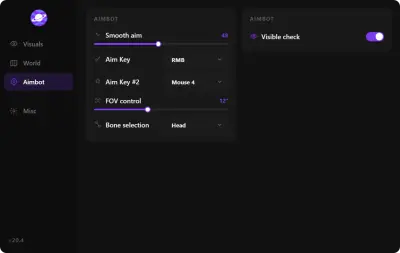
FOV means field of view: here it defines the area in which the aimbot looks for a target. A smaller area keeps selection close to your crosshair; a larger one covers more of the screen. Bone selection chooses the part of the enemy model to aim at. The visible check restricts aiming to enemies that are visible. Smooth aim is listed, without documented adjustment values or a smoothing range.
Visuals (ESP)
ESP is on-screen information about other players. Player markers locate them; a skeleton follows the model structure, while a box frames the player. The health display gives a health reference and radar supplies a position view. These are information tools, separate from aimbot target selection. The overlay is described as stream-proof, but capture methods and conditions are not specified; it should not be treated as a guarantee for every recording or streaming setup.
Misc
Save a configuration to keep settings you want to use again, then load it for a later session. Hotkeys provide keyboard control of features. The documented controls are FOV, bone selection, visible check, config save/load and hotkeys; the exact key bindings and available bones are not specified. See the saved configs and hotkeys guide for plain explanations of these controls.
Requirements
Windows 10 or Windows 11. HVCI on and Core Isolation on. TPM on and Secure Boot on. Cloud DMA is needed separately.
FACEIT only. Cloud DMA is a separate requirement; confirm the complete dependency setup before ordering.
Modules
What's included
The full option list for CS2 Faceit Cheats. Each line can be switched in the menu.
- Smooth aim
- FOV control
- Bone selection
- Visible check
- Player ESP
- Skeleton
- Box
- Health
- Radar
- Stream-proof overlay
- Config save and load
- Hotkeys
Experience
Aim, visuals and saved settings
The supplied images show gameplay overlays and menu controls. Captions describe each image; preparation checks are listed alongside them.
In-game layers
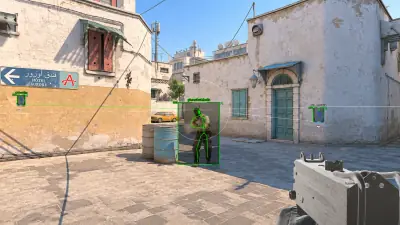
- Layer A
Courtyard ESP view
Supplied gameplay image showing player boxes and skeleton outlines around the courtyard.
- Layer B
Aim menu
Supplied menu image with aim controls, bone selection and a visible-check toggle. Displayed values are examples, not recommended settings.
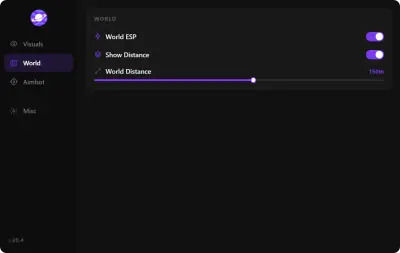
- Layer C
World menu
Supplied World panel with ESP and distance controls visible. The image does not establish the complete product feature list.
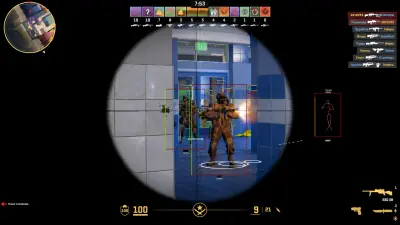
- Layer D
Scoped ESP view
Supplied gameplay image showing player overlays through a scoped view.
More products
Pairs well with
Utilities sold beside the cheat. Each one keeps a separate page.
- HWID Spoofer A separate utility for disk, MAC and GPU identifiers, with trace cleanup. It is not listed as included with or required by the FACEIT package. View details: HWID Spoofer
- Cloud DMA Cloud DMA is a separate requirement for the FACEIT package. Review its Windows, Hyper-V and service requirements on its own page. View details: Cloud DMA
- Skin Changer A separate cosmetic client for supported titles. FACEIT compatibility and inclusion in this package are not established. View details: Skin Changer
FAQ
Questions about this page
Read answers for this topic, or visit the full FAQ for other requirements.
Blog
Related guides
Understand FACEIT positioning, aim controls, ESP and the requirements before choosing a product.
Understand which CS2 environment the FACEIT Version targets and why Premier is outside this package’s scope.
Learn how a smaller or larger FOV changes the aimbot’s target-search area without inventing numeric presets.
Compare the documented visual tools by the information they provide during a CS2 round.

Review Windows 10/11, HVCI, Core Isolation, TPM, Secure Boot and the separate Cloud DMA requirement.