Player ESP
Positions at a glance.
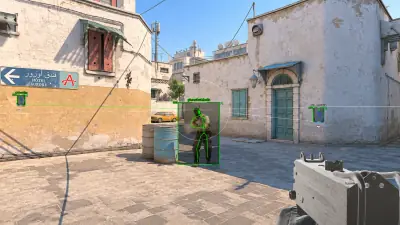
Player ESP marks positions on screen. Health information adds context when you track players through a CS2 round.
- Player markers
- Health display
- On-screen information
Aim controls, player ESP and saved configs for Counter-Strike 2 on FACEIT. Built for FACEIT lobbies only; standard Valve matchmaking and Premier are outside its scope. Windows 10 or 11 and Cloud DMA are needed.

FACEIT
Platform
10 / 11
Windows
ESP
Player information
FOV
Aim control
Features
Explore the documented FACEIT feature set. The product page explains each control and the Windows requirements.
Positions at a glance.
Player ESP marks positions on screen. Health information adds context when you track players through a CS2 round.
Two visual references.
Skeleton outlines the player model; box ESP frames it. Each gives a different reference for locating a player.
Choose the aim target.
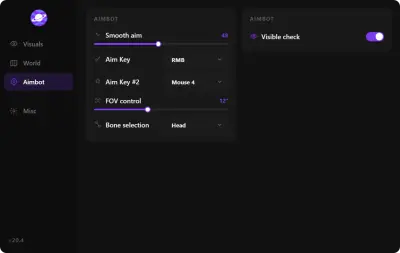
Smooth aim works with FOV control, bone selection and a visible check. Set the targeting area and the part of the model to aim at.
Visibility for aim selection.
Limit aiming to visible enemies. This check concerns aimbot targets rather than the information shown by ESP.
Track player positions.
A radar-style display shows player positions. The product does not specify the radar layout or where the display appears.
Set the targeting area.
A narrower field of view keeps target selection close to the crosshair. A wider FOV includes a larger area of the screen.
Keep your settings ready.
Save a configuration and load it again later. Your chosen FOV and aim target can form part of your setup routine.
Keyboard control.
Use keyboard shortcuts to control features. Available bindings should be checked in the product instructions.
A specific CS2 environment.
This build is made for FACEIT. It is not intended for standard Valve matchmaking or Premier.
Store
Explore the FACEIT package and three separate utilities. Cloud DMA is needed for the main product; the other utilities are not listed as part of it.
Explore the documented FACEIT feature set
Aim controls, player ESP and saved configs for Counter-Strike 2 on FACEIT. Built for FACEIT lobbies only; standard Valve matchmaking and Premier are outside its scope. Windows 10 or 11 and Cloud DMA are needed.
Disk, MAC and GPU identifier changes with a bundled trace cleaner.
A separate utility for disk, MAC and GPU identifiers, with trace cleanup. It is not listed as included with or required by the FACEIT package.
A Hyper-V environment for one Windows PC with guided installation and encrypted activation.
Cloud DMA is a separate requirement for the FACEIT package. Review its Windows, Hyper-V and service requirements on its own page.
Local weapon finishes, outfits and knife styles in supported titles.
A separate cosmetic client for supported titles. FACEIT compatibility and inclusion in this package are not established.
Why us
Explore the documented FACEIT feature set. The product page explains each control and the Windows requirements.
FACEIT Version
This build is made for FACEIT. It is not intended for standard Valve matchmaking or Premier.
Aimbot
Smooth aim works with FOV control, bone selection and a visible check. Set the targeting area and the part of the model to aim at.
Player ESP
Player ESP marks positions on screen. Health information adds context when you track players through a CS2 round.
Radar
A radar-style display shows player positions. The product does not specify the radar layout or where the display appears.
Saved configs
Save a configuration and load it again later. Your chosen FOV and aim target can form part of your setup routine.
Hotkeys
Use keyboard shortcuts to control features. Available bindings should be checked in the product instructions.
FACEIT
FACEIT Version
This build is made for FACEIT. It is not intended for standard Valve matchmaking or Premier.
FOV
FOV control
A narrower field of view keeps target selection close to the crosshair. A wider FOV includes a larger area of the screen.
ESP
Player ESP
Player ESP marks positions on screen. Health information adds context when you track players through a CS2 round.
Setup guide
Confirm the intended platform and your Windows settings before ordering. These are preparation checks; installation follows the product instructions.
Confirm FACEIT use
Check Windows security
Account for Cloud DMA
How it works
Choose the aim area, understand the visual tools and save the setup you want to revisit.
4 easy steps
FOV control
A narrower field of view keeps target selection close to the crosshair. A wider FOV includes a larger area of the screen.
Player ESP
Player ESP marks positions on screen. Health information adds context when you track players through a CS2 round.
Saved configs
Save a configuration and load it again later. Your chosen FOV and aim target can form part of your setup routine.
Hotkeys
Use keyboard shortcuts to control features. Available bindings should be checked in the product instructions.
Blog
Understand FACEIT positioning, aim controls, ESP and the requirements before choosing a product.
Understand which CS2 environment the FACEIT Version targets and why Premier is outside this package’s scope.
Learn how a smaller or larger FOV changes the aimbot’s target-search area without inventing numeric presets.
Separate the aim point from visibility filtering and understand what is actually documented for the FACEIT Version.
FAQ
Read answers for this topic, or visit the full FAQ for other requirements.